
BenQ ScreenBar or Quntis Light Bar? For eye strain?

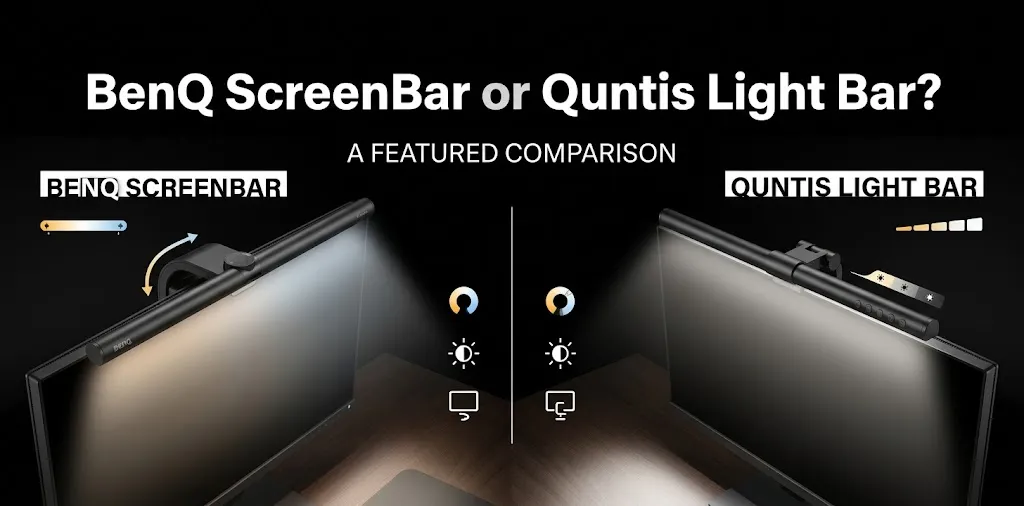
Choosing between the BenQ ScreenBar and a Quntis monitor light bar comes down to lighting control, glare reduction, adjustability, and price. Both are designed to illuminate your desk without taking up space like a traditional lamp. However, neither can guarantee relief from eye strain. The right setup depends on your monitor, room lighting, and work habits.
BenQ ScreenBar vs. Quntis: Quick Comparison
For most people looking for an affordable way to improve desk lighting, a Quntis light bar is a strong value. The standard BenQ ScreenBar is worth considering if you prefer its established design, automatic brightness control, and clearly specified lighting features. Both can help reduce distracting glare when set up correctly, but neither replaces good room lighting or regular screen breaks.
| Feature | BenQ ScreenBar | Quntis Monitor Light Bar |
|---|---|---|
| Best for | Premium, simple desk lighting | Value-focused buyers |
| Desk illumination | Angled light directed toward the desk | Angled lighting on many models |
| Brightness control | 15 brightness levels | Varies by model |
| Color temperature | Eight selectable settings | Adjustable on many models |
| Automatic dimming | Yes | Available on selected models |
| Controls | On-bar controls | On-bar controls or remote, depending on model |
| Monitor compatibility | Check clamp and screen shape | Check model-specific clamp limits |
| Price | Generally premium | Often more affordable |
| Main trade-off | Higher purchase cost | Features and fit vary across models |
| Available |  | |
Specifications vary by product generation. This comparison focuses on the standard BenQ ScreenBar and representative Quntis models rather than every product in either brand’s lineup.
How Monitor Light Bars Can Help With Eye Strain
A monitor light bar clips onto the top of your display and directs light onto your desk, keyboard, and nearby reading materials. Its angled optics are designed to limit light reflecting directly off the screen.
This can be helpful if you often work in a dim room, where the bright monitor stands out against dark surroundings. More balanced lighting may make your workspace more comfortable, especially when you switch between reading on-screen text and looking at papers on your desk.
However, eye strain is not caused by poor lighting alone. Long periods of close-up work, reduced blinking, dry eyes, an unsuitable viewing distance, and screen glare can all contribute to discomfort. A light bar addresses only part of that problem.
BenQ ScreenBar vs. Quntis for Eye Strain: Which Should You Buy?
BenQ ScreenBar: Best for a Premium, Simple Setup
The standard BenQ ScreenBar focuses on controlled desk illumination with a compact design. It offers 15 brightness levels, eight color temperature settings, and automatic dimming that adjusts the light based on the room’s ambient brightness.
BenQ also specifies a 60-by-30-centimeter lighting area at 500 lux.
Why choose BenQ?
- Automatic brightness adjustment: The built-in sensor helps adapt lighting to changing room conditions.
- Adjustable color temperature: Choose warmer or cooler light depending on your preference and task.
- Screen-glare control: Its angled optical design directs light toward the desk instead of straight at the display.
- Space-saving design: The bar mounts above the monitor, leaving your desk surface available for other items.
What to consider: BenQ’s premium positioning may not suit every budget. The standard ScreenBar is also different from the ScreenBar Halo 2 and ScreenBar Pro, which offer additional features. Check the exact model before purchasing.
BenQ makes sense if you want a straightforward lighting solution and value its design, controls, and published lighting specifications.
Quntis Light Bar: Best for Value and Flexible Controls
Quntis sells several monitor light bars, ranging from basic models to versions with wireless remotes, automatic dimming, and additional lighting features. That range gives buyers more flexibility when shopping on a budget.
For example, the Quntis Monitor Light Bar Focus PRO+ includes a wireless remote, adjustable brightness, a 3000K–6500K color temperature range, automatic dimming, and a two-hour timer. Its listed price has been around $69.99, although prices can change.
Why choose Quntis?
- More budget flexibility: You can choose a simpler model or pay more for added controls.
- Remote options: Selected versions let you adjust lighting without reaching for the bar.
- Adjustable light settings: Many models support brightness and color temperature changes.
- Monitor compatibility options: Some models support curved and flat screens, but the limits depend on the specific design.
What to consider: Do not assume every Quntis light bar has automatic dimming, a remote, or the same optical design. Check the model number, mounting requirements, warranty, and return policy before purchasing.
Quntis is a sensible choice if you want useful lighting controls without automatically paying for a premium product.
Which Light Bar Is Better for Your Specific Eye Strain Problem?
The best choice depends on what’s making your eyes uncomfortable. Neither brand has established that its light bar treats eye strain better than the other in direct clinical comparisons.
| Your situation | Better starting point | Why |
|---|---|---|
| You work in a dim room | Either brand | Both offer models designed to illuminate the desk |
| You want automatic dimming | Either, with model verification | Both brands offer automatic adjustment on selected models |
| You need a wireless remote | A remote-equipped Quntis model | Selected versions include remote controls |
| You prefer BenQ’s standard design | BenQ ScreenBar | Its controls and lighting specifications are clearly documented |
| You want to spend less | A suitable basic Quntis model | You can avoid paying for features you do not need |
| You use a curved or ultrawide monitor | Whichever model fits your display | Clamp design and lighting coverage matter more than brand alone |
If Your Eyes Feel Tired in a Dark Room
Start by improving the lighting throughout your workspace. A monitor light bar can illuminate your keyboard and nearby papers, but it does not light the entire room.
For example, if you work late in a bedroom with the overhead light off, adding a monitor light bar may help balance the bright screen against the dark desk area. Keeping some comfortable room lighting on may help further.
If Your Screen Reflects Light
Check the placement of windows, overhead fixtures, and desk lamps before buying anything. Reflections can make text harder to read and cause you to adjust your posture or squint.
Both BenQ and some Quntis models use angled lighting to reduce screen reflections. However, your monitor’s finish, viewing angle, and the position of nearby lights still affect the result. A monitor light bar cannot eliminate every source of glare.
If Your Eyes Feel Dry After Long Work Sessions
A new light bar may not solve the problem. People often blink less during extended screen use, which can contribute to dry eyes and discomfort.
Regular breaks, an appropriate viewing distance, and balanced room lighting may help. If symptoms continue, consult an eye care professional rather than relying on a lighting accessory alone.
How to Set Up a Monitor Light Bar for Comfortable Viewing

Regardless of which brand you choose, use these steps to get more from your purchase.
- Check the monitor mount. Confirm that the clip fits your screen’s thickness, curvature, and rear housing. Make sure it does not interfere with a webcam.
- Aim the light toward the desk. Adjust the bar so it illuminates your keyboard and reading area without creating reflections on the display.
- Start with moderate brightness. Increase or decrease it until your desk is easy to see without making the screen or surrounding area feel uncomfortably bright.
- Choose a comfortable color temperature. Warmer light may feel more pleasant in the evening, while cooler light may suit daytime tasks. Personal comfort matters more than selecting one supposedly perfect setting.
- Balance the room lighting. Avoid relying on a bright monitor and a small pool of desk light in an otherwise dark room.
- Take regular breaks. Every 20 minutes, look at something about 20 feet away for at least 20 seconds. This is the 20-20-20 rule for reducing digital eye discomfort.
What About Blue Light and Eye Protection?
Neither BenQ nor Quntis should be purchased on the assumption that a special light setting will prevent eye damage.
Digital eye discomfort is generally associated with factors such as prolonged near work, reduced blinking, and screen-use habits. There is no strong evidence that ordinary computer screen blue light causes eye damage, and special blue-light-blocking glasses are not generally recommended for routine computer use.
A monitor light bar’s more practical purpose is to improve desk lighting and help control unwanted glare. You should still set your screen brightness to a comfortable level, keep a suitable viewing distance, and take breaks.
Frequently Asked Questions
Still deciding between the BenQ ScreenBar and Quntis Light Bar? These frequently asked questions cover eye strain, glare reduction, key features, and value to help you choose the right monitor light bar for your workspace.
Is BenQ ScreenBar worth the extra money over Quntis?
BenQ may be worth the premium if you value its design, published lighting specifications, and straightforward controls. Quntis can offer better value if a less expensive model provides all the features you actually need.
Can a Quntis light bar reduce eye strain as well as BenQ?
A suitable Quntis model can provide the same basic benefit of directing light onto your desk while limiting screen reflections. However, there is not enough direct comparative clinical evidence to say that either brand reduces eye strain better than the other.
Should I buy a monitor light bar if I already use a desk lamp?
Not necessarily. If your desk is already evenly lit and you have little screen glare, a monitor light bar may offer limited additional benefit. Consider one if your current lamp creates reflections, takes up too much space, or leaves your keyboard and reading area poorly lit.
Final Verdict
Quntis is my value-focused recommendation, while BenQ ScreenBar is the premium alternative. For most buyers, the better purchase is the model that fits their monitor, directs light onto the desk without creating screen reflections, and offers comfortable brightness control at a reasonable price.