UGREEN 100W or Anker Prime 67W? For MacBook Pro?

Choosing between the UGREEN 100W charger and the Anker Prime 67W charger comes down to how you use your MacBook Pro. UGREEN offers more charging power for demanding workloads and compatible devices, while Anker’s 67W option can be a practical choice for everyday work and travel. Your MacBook Pro model, charging needs, and other devices should guide your decision.
Key Differences Between the Two Chargers
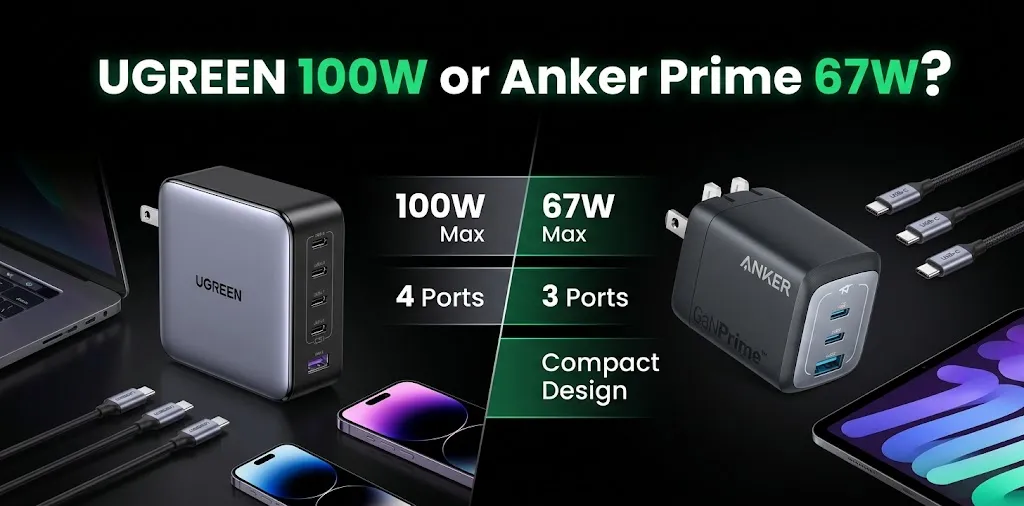
The biggest difference is maximum output. The UGREEN Nexode 100W can deliver up to 100 watts through a compatible USB-C port, while the Anker Prime 67W tops out at 67 watts. Both models offer multiple ports, but the exact number and power distribution depend on the UGREEN version you choose.
| Feature | UGREEN Nexode 100W | Anker Prime 67W |
|---|---|---|
| Maximum power | 100W | 67W |
| USB-C ports | 2 or 3, depending on model | 2 |
| USB-A ports | 1 on common models | 1 |
| Maximum single USB-C output | Up to 100W | Up to 67W |
| Charging multiple devices | Better suited to higher-power needs | Good for everyday multi-device charging |
| Best use | Demanding laptop workloads and flexibility | Everyday work and compact travel setups |
| Power technology | GaN | GaNPrime |
| Main advantage | Higher power capacity | Compact design and portability |
| Available |  | |
These specifications refer to common UGREEN Nexode 100W models and the Anker Prime 67W three-port charger. Check the exact model before buying.
Which Charger Works Better With a MacBook Pro?

Both chargers can work with compatible MacBook Pro models through USB-C Power Delivery. However, the best choice depends on your laptop’s size, processor, and workload.
UGREEN 100W for More Charging Headroom
The UGREEN 100W charger is the stronger option when you want more power available for your MacBook Pro. Its higher output can be useful when you work with demanding applications, connect accessories, or want to charge your laptop alongside a phone or tablet.
Apple’s power recommendations vary by MacBook Pro model. A 100W charger does not guarantee that every MacBook Pro will charge at its maximum supported speed, and some models may benefit from a higher-wattage adapter.
Consider UGREEN if you:
- Use your MacBook Pro for video editing, development, or other demanding tasks.
- Want more power available when charging compatible devices together.
- Prefer one charger that can serve several USB-C devices.
- Want additional charging capacity for a future laptop.
Anker Prime 67W for Everyday Work
The Anker Prime 67W is a capable option for compatible MacBook Pro models, especially for schoolwork, browsing, writing, email, and office tasks. It has two USB-C ports and one USB-A port, with a maximum single-port USB-C output of 67W.
Choose Anker if you:
- Mostly use your MacBook Pro for everyday tasks.
- Carry your charger between home, school, work, and cafés.
- Want to charge your laptop and phone with one adapter.
- Don’t need the extra power available from a 100W charger.
When charging multiple devices, remember that the available output is shared. The Anker Prime 67W model supports a maximum of 65W when two ports are used and 64.5W when all three ports are active.
Charging Speed: Does 100W Make a Big Difference?

A 100W charger has a higher maximum output than a 67W charger, but that does not mean it will always charge your MacBook Pro proportionally faster.
Actual charging speed depends on the laptop’s supported input power, battery level, temperature, workload, cable, and whether other devices are connected. A MacBook Pro that draws less than 67W under a given condition may see little difference between these chargers.
For example, imagine two situations:
- Writing and browsing: Your MacBook Pro may not need the full 100W, so the Anker could be sufficient.
- Heavy work while charging: A compatible MacBook Pro may benefit from the additional available power of the UGREEN, especially if the laptop draws more power under load.
If your priority is fast charging, check Apple’s recommended adapter wattage for your exact model rather than choosing by wattage alone.
Using One Charger for Your MacBook Pro and Other Devices
A multiport charger can reduce the number of adapters you need to pack. But the total wattage printed on the charger is not necessarily what your MacBook Pro receives when other devices are connected.
The UGREEN 100W range includes models with different port layouts and output limits. Some versions offer three USB-C ports and one USB-A port, while others have fewer ports. Anker’s Prime 67W model has two USB-C ports and one USB-A port.
For a typical travel setup:
- Connect your MacBook Pro to a USB-C port that supports the laptop’s required power.
- Use another port for your phone or tablet.
- Check the manufacturer’s power-sharing chart before connecting everything at once.
If you regularly charge a MacBook Pro, iPad, and phone together, the UGREEN 100W option generally provides more total power capacity. If your phone and laptop are the main devices you charge, Anker’s 67W model may be enough.
Which Charger Is Better for Travel?
Both are suitable for travel when you have the correct plug and a compatible cable. The Anker Prime 67W is particularly appealing if you value a compact charger for everyday carry. The UGREEN 100W model is worth considering if you want higher output and more flexibility for several devices.
Before traveling, check the exact charger’s dimensions, weight, port layout, and plug design. Also, confirm that it supports the electrical input used at your destination. Both product ranges include different versions, so do not assume every model has the same physical design.
Safety and Compatibility: What MacBook Pro Owners Should Check
Third-party USB-C chargers can be suitable for MacBook Pro use when their specifications match the laptop’s requirements. A few checks can help you avoid buying the wrong model.
- USB-C Power Delivery: Confirm that the charger supports USB-C PD at the voltage and power your MacBook Pro needs.
- Cable rating: Use a USB-C cable rated for the intended charging power. A cable that cannot support the required output may limit charging.
- Power sharing: Check whether connecting a phone or tablet reduces the laptop’s available wattage.
- Your MacBook Pro model: Check Apple’s recommended adapter for your particular year and screen size.
- Product authenticity: Buy from a reliable seller and check the exact model number and warranty terms.
Frequently Asked Questions
If you’re still deciding between these chargers, the following answers address common concerns about MacBook Pro compatibility, charging safety, and overall value.
Is a 67W charger enough for a MacBook Pro?
It can be enough for compatible MacBook Pro models, particularly for everyday tasks. Check your exact model’s recommended adapter wattage because some configurations may need more power for optimal charging.
Will a UGREEN 100W charger damage my MacBook Pro?
A properly designed, compatible USB-C Power Delivery charger should negotiate the power the connected device supports rather than forcing 100W into it. Use a reputable charger and a suitable cable, and verify the specifications for your MacBook Pro.
Is UGREEN better than Anker for MacBook Pro charging?
UGREEN’s 100W model offers more maximum power, making it a better fit when you need higher output or charge several devices. Anker’s Prime 67W is a sensible choice for everyday use when its lower output meets your laptop’s needs.
Final Verdict
The UGREEN Nexode 100W is the better overall pick if you want more charging headroom for your MacBook Pro. Its higher maximum output gives you more flexibility for demanding workloads and multiple devices. The Anker Prime 67W remains a good option for everyday work and travel if 67W meets your laptop’s requirements.